August 11, 2014

Freya Beta 1 Available For Developers & Testers

Daniel Foré ( project lead of elementary OS ) announced today that the first beta of elementary OS Freya is publicly available for developers and testers.

Be aware that this is not intended to be used in a production environment :

Software in the beta phase will generally have many more bugs in it than completed software, as well as speed/performance issues and may still cause crashes or data loss.

As omgubuntu says :

So, folks: beta. No finish. No polish. Much bugs. Get it? Got it? Good.

Let's get it :

Freya Beta 32bit | Torrent

Freya Beta 64bit  | Torrent


June 22, 2014

Next Release Renamed To Freya

The next release elementary OS, until now codenamed Isis, has a new name : elementary OS Freya.

The OS releases are named after mythological deities and beings ( Jupiter, Luna ).

According to the developers :

While Isis worked well, there is currently an active militant group in Iraq and Syria commonly known as "ISIS" (Islamic State in Iraq and Syria). elementary obviously has no ties to that group—and we don't think people will get us confused—but we want to both recognize the ongoing turmoil and choose a less controversial name.


Freya is a Norse goddess of love and beauty.

http://elementaryos.org/journal/elementary-os-isis-is-now-freya

Is Freya Released Yet?

June 1, 2014

Lubuntu Software Center

Lubuntu Software Center is a user-friendly, fast and light-weight alternative for Software Center.
It was especially optimised for Lubuntu, a light-weight distro based on Ubuntu.

To install open a Terminal and type :

sudo apt-get install lubuntu-software-center

or use Software Center....

The default view :


There are three tabs at the top: Get Software, Installed Software, and Apps Basket.

If you want to add an application, click the button Add to the Apps Basket :


The Information button will show a description with a screenshot and reviews.

The Apps Basket with the packages to be installed :


Discard button will empty the Apps Basket.

Removing installed software :


Keyboard Shortcuts For Window Placement

There are a number of keyboard shortcuts in System Settings > Keyboard > Windows, but to add more of them you will need a tool called dconf-editor.

To install this tool open a Terminal and copy/paste next line :

sudo apt-get install dconf-tools

Applications > dconf Editor

Navigate to org > gnome > desktop > wm > keybindings

We are going to add keyboard shortcuts to place windows in these different directions :


Keys that are used : Super ( Windows ) and Keypad numbers.

Assign the following shortcuts :


May 30, 2014

New Community Website Launched Today

Stephen Myall, owner of the popular website reboot2elementary, has announced today that a new community website for elementary OS users has launched.
The new website is a collaboration of Stephen Myall with a project team of elementary OS users.

The new elementarynow site is still work in progress and all new visitors are encouraged to provide feedback and comments about what you like, what you don’t like and what you would like to see more of.


In order to participate in the forums you must register as a user and why not introduce yourself to other members while you are there.


What to expect…

  • All your favorite “how tos”, tutorials and much more.
  • Keep up to date with the latest elementary news as well as featured editorials.
  • Interact with other community members on our forum –a place where elementary users can help themselves by asking and answering questions. Or just say Hi! 

What are the objectives of the elementarynow website?


  • elementarynow is a growing community supporting the official elementary OS project.
  • We strive to be a reputable source of information and guidance for all users of the “stable” elementary operating system.
  • elementarynow aims to popularize elementary OS for everyday computer users with all levels of computer experience
  • We recognize and support users who wish (or have a requirement) to utilize elementary OS a base and deviate from the “out of the box” experience by individualizing their desktop environment with the use of 3rd party decorations and applications.
  • elementarynow will always support and respect the intended design of elementary OS and its applications by making clear distinctions and warning in our publications when users ask to deviate.

Remember that the new website is still in it's testing period.

After this period the website reboot2elementary will retire.

May 26, 2014

Google Chrome With Double Icon In Plank

I recently downloaded Google Chrome from this page. The download for my computer is google-chrome-stable_current_amd64.deb ( Version 35.0.1916.114 ).

Installation is simple : right click the package and choose Open With Software Center.

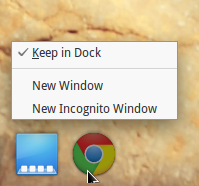
Start Google Chrome with Applications > Google Chrome and an icon will appear in Plank. Right click the icon and check Keep In Dock.


After closing and restarting Google Chrome a second fuzzy looking icon appears in Plank :


To solve this problem :

Open Slingshot ( Applications ) and type gksu in the searchbox :

Run pantheon-files as root :


Navigate to File System >usr >share >applications and find the Google Chrome icon. Right click and choose Open With Scratch.
On three lines starting with Exec=/usr/bin/  you need to replace  google-chrome-stable with google-chrome.

Done...

Update : this solution might not work anymore. What can work is the following ( in Terminal ) :
cp /usr/share/applications/google-chrome.desktop ~/.local/share/applications

Open google-chrome.desktop with Scratch and write under [Desktop Entry] the following line :

StartupWMClass=Google-chrome-stable

May 20, 2014

Kingsoft Office Elementary Style

Kingsoft Office is a commercial, closed-source office suite developed by Chinese software developer Kingsoft. Components include: Kingsoft Writer, Kingsoft Presentation and Kingsoft Spreadsheet.
The basic version is free to use, but a fully featured Pro version is also available, for the differences see here.

The latest version Kingsoft Office 2013 is highly compatible with MS Office, but one of the drawbacks is that it doesn’t support OpenDocument Format. Instead you can export your documents to PDF, or save them as MS Office formats or Kingsoft Office formats.

Download Kingsoft Office from here. The latest Linux binary at the time of writing is Linux Alpha 12 Patch 4.

The package kingsoft-office_9.1.0.4280~a12p4_i386.deb will usually be in Applications > Files > Downloads.
To install I used gdebi, a simple tool to install .deb files ( search for gdebi in Software Center if you haven't installed it yet ).

Right click the package kingsoft-office_9.1.0.4280~a12p4_i386.deb and choose Open With GDebi Package Installer.
A lot of extra 32-bit packages will be installed if running a 64-bit system ( see Applications > System Settings > About ).

Kingsoft Writer, ongmani skin ( right corner > Skin manager ) :


Zsolt Ádám Albert has altered this skin a bit to have a more elementary look :


Download the needed wps_office_elementary_theme.zip from here.

Open a Terminal and : 

cd Downloads
sudo unzip -o wps_office_elementary_theme.zip -d /opt/kingsoft/wps-office/office6/res/themes

Start e.g. Kingsoft Writer and right click the top bar and check Use System Title Bar.