Open a Terminal and try the next commands :
dbus-send --session --dest=org.pantheon.gala --print-reply /org/pantheon/gala org.pantheon.gala.PerformAction int32:1
Luna : Workspace Overview ( keep Enter pressed ), Freya : Multitasking View
dbus-send --session --dest=org.pantheon.gala --print-reply /org/pantheon/gala org.pantheon.gala.PerformAction int32:2
Terminal maximizes
dbus-send --session --dest=org.pantheon.gala --print-reply /org/pantheon/gala org.pantheon.gala.PerformAction int32:3
Terminal minimizes
dbus-send --session --dest=org.pantheon.gala --print-reply /org/pantheon/gala org.pantheon.gala.PerformAction int32:4
Slingshot-launcher opens
dbus-send --session --dest=org.pantheon.gala --print-reply /org/pantheon/gala org.pantheon.gala.PerformAction int32:5
Show Desktop
dbus-send --session --dest=org.pantheon.gala --print-reply /org/pantheon/gala org.pantheon.gala.PerformAction int32:6
Window Overview
dbus-send --session --dest=org.pantheon.gala --print-reply /org/pantheon/gala org.pantheon.gala.PerformAction int32:7
Show All Windows
Desktop files for Show Desktop and Workspace Overview are provided by package elementary-plank-extra :
Freya : https://launchpad.net/~versable/+archive/ubuntu/elementary-tweaks-isis
Luna : https://launchpad.net/~versable/+archive/ubuntu/elementary-update
September 29, 2014
September 5, 2014
Add An Up Button To Pantheon-Files
Default look of Pantheon-Files with Backward and Forward buttons :
To add an Up button to the toolbar of Pantheon-Files we need dconf Editor.
You can install it by opening a Terminal and typing the following command :
sudo apt-get install dconf-tools
Start dconf Editor and go to org > pantheon > files > preferences and look for toolbar-items in the right pane :
['Back', 'Forward', 'ViewSwitcher', 'LocationEntry']
Change into ['Back', 'Forward', 'Up', 'ViewSwitcher', 'LocationEntry']
Restart Pantheon-Files :
To add an Up button to the toolbar of Pantheon-Files we need dconf Editor.
You can install it by opening a Terminal and typing the following command :
sudo apt-get install dconf-tools
Start dconf Editor and go to org > pantheon > files > preferences and look for toolbar-items in the right pane :
['Back', 'Forward', 'ViewSwitcher', 'LocationEntry']
Change into ['Back', 'Forward', 'Up', 'ViewSwitcher', 'LocationEntry']
Restart Pantheon-Files :
August 19, 2014
Change Button-layout In Freya Beta 1
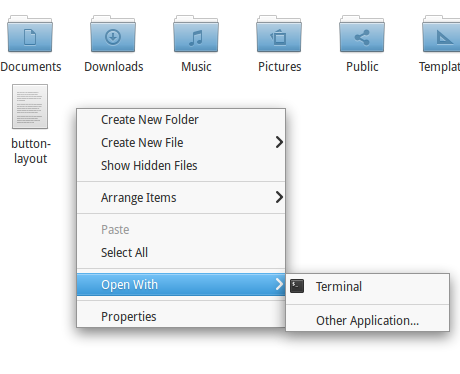
Right click in your Home directory and choose Create New File > Empty File.
Name it e.g. button-layout.
Open file with Scratch and paste the following lines :
#!/bin/bash
gsettings set org.gnome.settings-daemon.plugins.xsettings overrides "{'Gtk/DecorationLayout': <'"$1"'>}"
gsettings set org.pantheon.desktop.gala.appearance button-layout "'"$1"'"
gsettings set org.gnome.desktop.wm.preferences button-layout "'"$1"'"
Close Scratch... ( file will be auto-saved ).

Right click and choose Open With > Terminal.
To change layout in : Close ( left ) and Minimize ( right ) type in Terminal :
sh ./button-layout close:minimize
To change layout in Minimize, Maximize, Close ( all right side ) :
sh ./button-layout :minimize,maximize,close
To change layout to Close ( left ) :
sh ./button-layout close:
( works in the stable version Luna as well ).
August 11, 2014
Freya Beta 1 Available For Developers & Testers
Be aware that this is not intended to be used in a production environment :
Software in the beta phase will generally have many more bugs in it than completed software, as well as speed/performance issues and may still cause crashes or data loss.
As omgubuntu says :
So, folks: beta. No finish. No polish. Much bugs. Get it? Got it? Good.
Let's get it :
Freya Beta 32bit | Torrent
Freya Beta 64bit | Torrent
June 22, 2014
Next Release Renamed To Freya
The next release elementary OS, until now codenamed Isis, has a new name : elementary OS Freya.
The OS releases are named after mythological deities and beings ( Jupiter, Luna ).
According to the developers :
While Isis worked well, there is currently an active militant group in Iraq and Syria commonly known as "ISIS" (Islamic State in Iraq and Syria). elementary obviously has no ties to that group—and we don't think people will get us confused—but we want to both recognize the ongoing turmoil and choose a less controversial name.
Freya is a Norse goddess of love and beauty.
http://elementaryos.org/journal/elementary-os-isis-is-now-freya
Is Freya Released Yet?
The OS releases are named after mythological deities and beings ( Jupiter, Luna ).
According to the developers :
While Isis worked well, there is currently an active militant group in Iraq and Syria commonly known as "ISIS" (Islamic State in Iraq and Syria). elementary obviously has no ties to that group—and we don't think people will get us confused—but we want to both recognize the ongoing turmoil and choose a less controversial name.
Freya is a Norse goddess of love and beauty.
http://elementaryos.org/journal/elementary-os-isis-is-now-freya
Is Freya Released Yet?
June 1, 2014
Lubuntu Software Center
Lubuntu Software Center is a user-friendly, fast and light-weight alternative for Software Center.
It was especially optimised for Lubuntu, a light-weight distro based on Ubuntu.
To install open a Terminal and type :
sudo apt-get install lubuntu-software-center
or use Software Center....
The default view :
There are three tabs at the top: Get Software, Installed Software, and Apps Basket.
If you want to add an application, click the button Add to the Apps Basket :
The Information button will show a description with a screenshot and reviews.
The Apps Basket with the packages to be installed :
Discard button will empty the Apps Basket.
Removing installed software :
It was especially optimised for Lubuntu, a light-weight distro based on Ubuntu.
To install open a Terminal and type :
sudo apt-get install lubuntu-software-center
or use Software Center....
The default view :
There are three tabs at the top: Get Software, Installed Software, and Apps Basket.
If you want to add an application, click the button Add to the Apps Basket :
The Information button will show a description with a screenshot and reviews.
The Apps Basket with the packages to be installed :
Discard button will empty the Apps Basket.
Removing installed software :
Keyboard Shortcuts For Window Placement
There are a number of keyboard shortcuts in System Settings > Keyboard > Windows, but to add more of them you will need a tool called dconf-editor.
To install this tool open a Terminal and copy/paste next line :
sudo apt-get install dconf-tools
Applications > dconf Editor
Navigate to org > gnome > desktop > wm > keybindings
We are going to add keyboard shortcuts to place windows in these different directions :
Keys that are used : Super ( Windows ) and Keypad numbers.
Assign the following shortcuts :
To install this tool open a Terminal and copy/paste next line :
sudo apt-get install dconf-tools
Applications > dconf Editor
Navigate to org > gnome > desktop > wm > keybindings
We are going to add keyboard shortcuts to place windows in these different directions :
Keys that are used : Super ( Windows ) and Keypad numbers.
Assign the following shortcuts :
Subscribe to:
Posts (Atom)